
Available with any of the following tiers: Essential, Premium, and Hospitality Plus
Instructions
- Log in to your OpenTable guest center
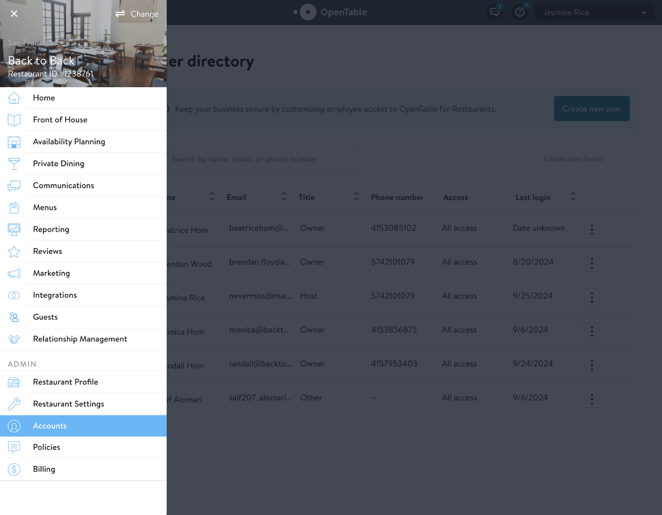
- Open the menu, and go to Accounts
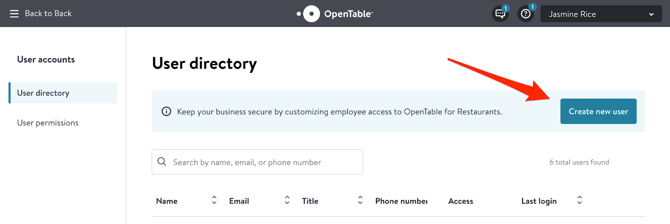
- Once in the Accounts page, click Create new user
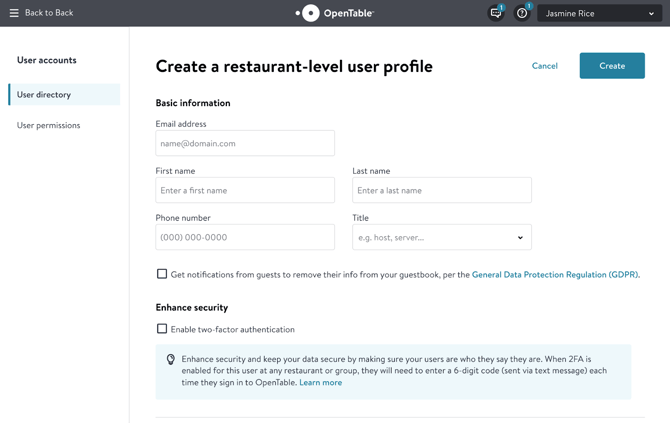
- Use the following credentials:
- Email address: Email address we provided
- First name: Jasmine
- Last name: Hostie
- Title: Host
- Default roles:
- Front of house
- Guest Management / Relationship Management
- You’ll receive an email to activate the account. Please click activate.
Step-by-step instructions with screenshots
-
Log into OpenTable guest center and navigate to the ‘Accounts’ page
- Click ‘Create new user’
- Use the details above. Do not check two-factor authentication.
Pro tip: Check your availability planning settings, as this is what reflects when we book for you!